
Before you knock.
Know them. Every detail.
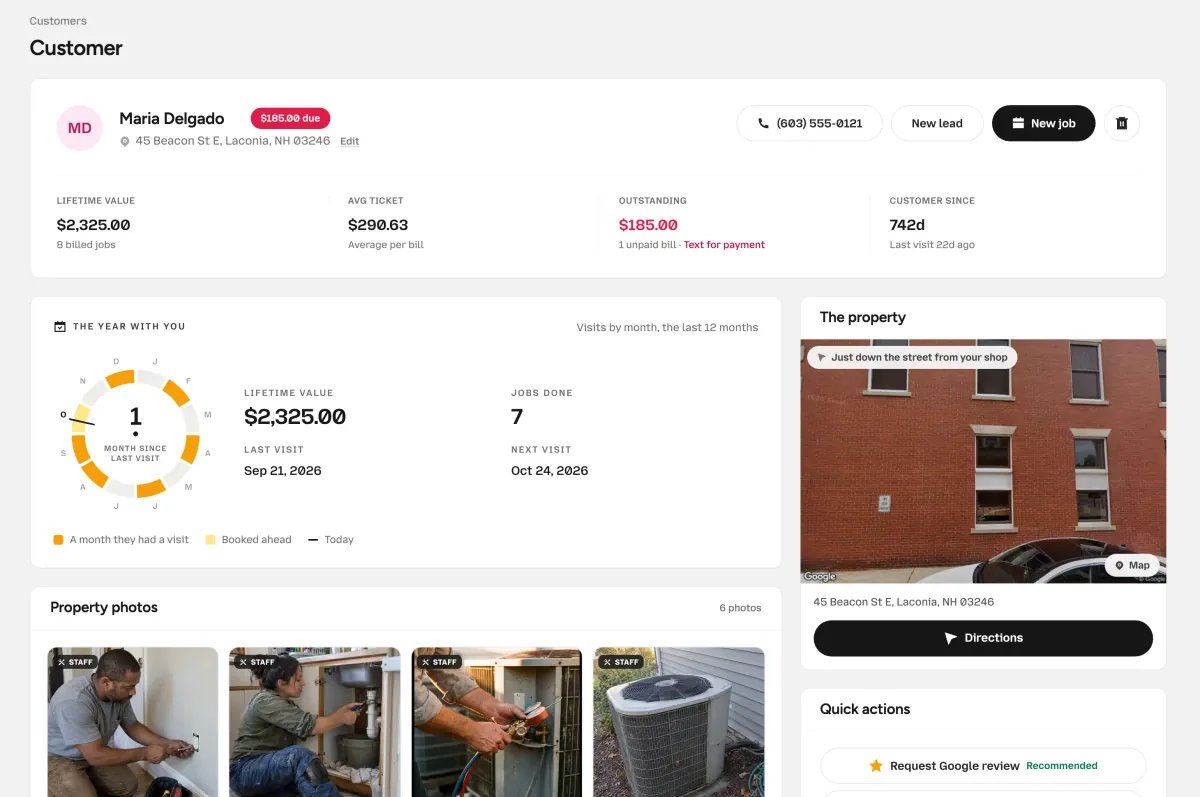
Every visit, invoice, photo and piece of equipment on one page, with notes for the tech and what’s still owed.

Yep, it’s all in here.
Pull their file.
Visits, invoices, photos and notes, together on one customer page. What they owe stays right at the top.
The money up top.
Lifetime value, average ticket, what’s still owed and how long they’ve been with you.
Every visit and bill.
Past visits, the next one, invoices and estimates, and the activity history.
The house itself.
Photos from your techs and the customer, the equipment, and notes for the tech.
Thirteen winters and counting.
Read the plate once.
Save equipment details once. See each unit’s age, warranty and service notes before the next visit.
Furnaces, AC and condensers, heat pumps, mini-splits, water heaters, boilers, thermostats, electrical panels and generators.
Equipment
Equipment on fileFurnace · Carrier 58STA090
13 yrs oldOut of warranty
Water heater · Bradford White RG250T6N
Under warranty
- Make
- Carrier
- Model
- 58STA090
- Installed
- Nov 2012
- Warranty ends
- Nov 2022
- Location
- Basement
- Notes
- 16x25x1 filter, left side
Nudge ’em, nicely.
The money, without digging.
See lifetime value, average ticket and unpaid invoices at a glance. Jobs and invoices are matched so nothing counts twice.
A paid job marks the customer Active. No one has to remember to.
Maria Delgado
- Lifetime value
- $2,325.00
- Avg ticket
- $290.63
- Outstanding
- $185.00
- Customer since
- 742d
Run it twice. No doubles.
Bring your list.
Import your customer CSV. Every booked job keeps it up to date.
Upload a CSV.
Names, numbers and more. The columns match automatically.
Nobody twice.
Existing phone numbers are skipped, so nobody is added twice.
Then it keeps itself.
New jobs update the book. Export it any time.
customers-export.csv
40 rows| Name | Phone | |
|---|---|---|
| Tom Becker | (603) 555-0118 | tom.becker@example.com |
| Priya Raman | (603) 555-0164 | priya.r@example.com |
| Maria DelgadoAlready in your book | (603) 555-0121 | maria.delgado@example.com |
| Luis Ortega | (603) 555-0137 | lortega@example.com |
| Ann Whitaker | (603) 555-0191 | ann.w@example.com |
36
Questions about customers.
Bringing your list in, what a customer’s page holds, and keeping it tidy.
Can I import my customers?
Yes. Upload a CSV and the columns are matched for you: name, phone, email, address, company, notes, tags, lead source and status. Anyone whose phone number is already in your book is skipped, so running it again is safe.
Do I have to add customers by hand?
No. Booking a job creates the customer, or updates them, by phone number. You can still add someone yourself, and only a name is required.
What’s on a customer’s page?
Their visits, the next visit, invoices and estimates, photos, equipment, notes for the tech, tags and activity. Up top: lifetime value, average ticket, what’s outstanding and how long they’ve been a customer.
Can I track equipment and warranties?
Yes. Save the type, make, model, serial number, install date and warranty end date for each unit. OnSiteCall shows how old it is and whether it’s under warranty, ending soon, or out of warranty.
Can I export my customer list?
Any time. Export a CSV of the list you’re looking at, with name, phone, email, address, company, status, tags, lead source and notes.
Can I mark someone do-not-contact?
Yes. Turn on Do not contact on their page, and texts and follow-ups to them stop.
Even the dog’s name.
Remember everyone.
Bring your customer list in by CSV, then let every booked job keep it up to date.
Try it free for 15 days. No credit card required.