
Fresh one in.
Win the lead. Book the job.
Your website form and chat bring in the problem and the photos. Send a quote, record their approval, and arrange the right time for the work.

Off the clock? Still open.
It all lands in Leads.
Website forms, chat and leads you add yourself land in one place, with their photos and messages attached.
Your website form.
Their answers, up to 8 photos, and a time picked from your open slots.
Your website chat.
AI answers from your business details and price book. The conversation stays with the lead.
Or add one yourself.
Took one by phone or in person? Press New lead and it joins the rest.
Request a service
Website formUpstairs AC runs but blows warm air since Saturday.
One lead. The whole story.
The request, job status and every text, together on the lead’s page.
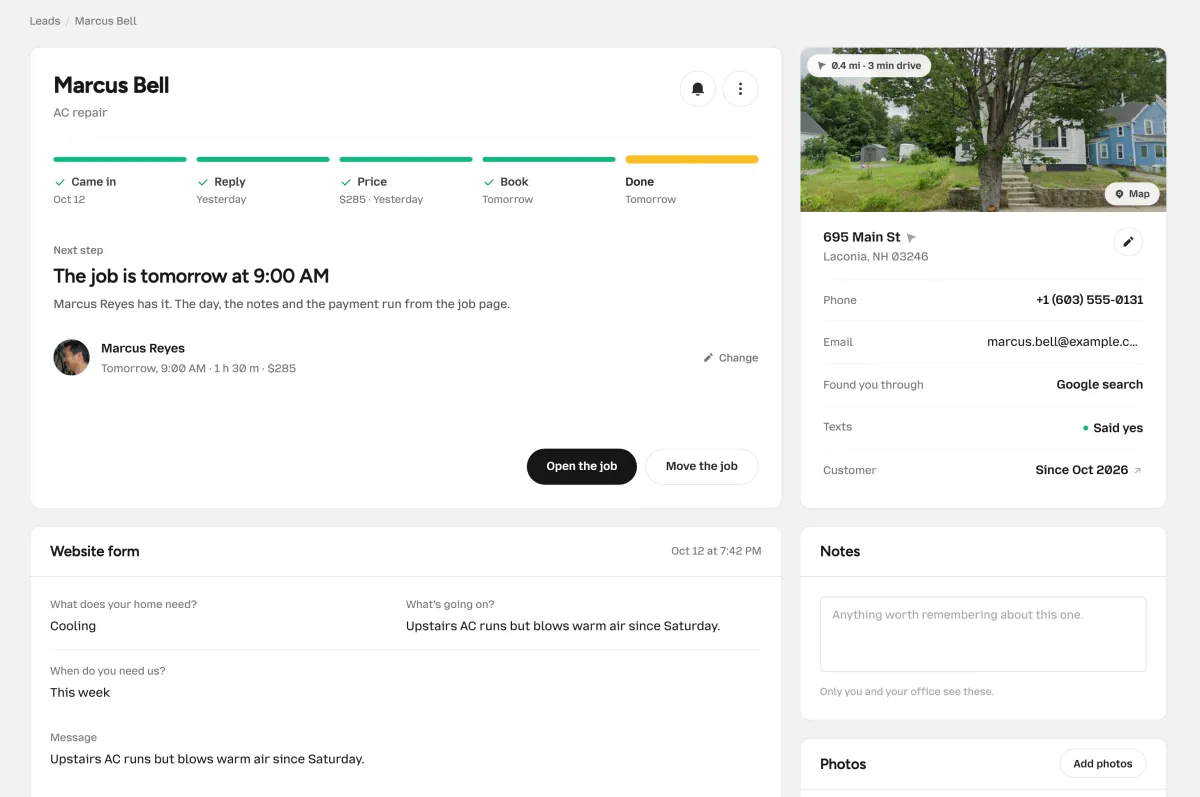
AC repair · Example conversation
Quote accepted · Ready to schedule
- Every stop, tracked.
- Every answer, kept.
- Quote. Approve. Schedule.
Not every lead books.
Set a reminder for the ones worth another try. Mark the rest lost with a reason, and find them again any time.
No lead left hanging.
Priya Nair
Remind me
Or mark it lost. Why?
No phone tag.
A yes. Then a time.
Their reply records approval of the quote. Their estimate link keeps the next step clear: choose a time or arrange it with you.
A time that works for both.
Offer specific appointments, let them pick from your availability, or arrange the visit yourself.
Said yes another way?
Record approval from a phone call, email or in-person conversation, then book the agreed time.
Texting starts once your carrier registration is approved.
Marcus BellAC repair · Texts
Hi Marcus, your AC repair quote is $285.00. Reply YES to accept the price. We’ll arrange the appointment next.
You · 7:05 AM · DeliveredYES
Marcus · 7:31 AMEllsworth HVAC has your approval. Open your estimate link to see the next step and choose a time when booking is available.
Next-step message · 7:32 AM- Quote accepted · Time to arrange
Questions about leads.
Where they come from, what the customer sees, and what happens after YES.
Where do leads come from?
Your website form and your website chat. Each request lands in Leads with its answers, photos or chat attached. You can also add a lead yourself for anyone who calls, texts, emails or stops you in person.
Can customers send photos?
Yes. Your website form can ask for photos, up to 8 with each request. They show up on the lead, right beside the answers.
What happens when they reply YES?
A clear YES to the current quote records their approval. Booking is the next step: let them choose an available time from their estimate link, offer specific times, or arrange the visit yourself. Approval alone does not reserve an appointment. Texting requires carrier approval.
Can I add a lead myself?
Yes. Press New lead, add their name and a phone number or email, and say how they reached you. It walks the same track as every other lead.
What if a lead goes quiet?
Set a reminder on the lead, or turn on automatic follow-ups in your own words. Quiet-lead reminders start at 2 and 5 days, and you can change the timing. They are off until you enable them and send only between 9 AM and 7 PM in your business time zone.
Do phone calls become leads?
No. Calls to your business number ring your own phone. If a call turns into work, add the lead in seconds.
It’s already on its way.
Catch the next one.
Put the form and chat on your website, and every request lands in Leads, ready for a price.
Try it free for 15 days. No credit card required.